
What is House Sitting?
House Sitting is a service where you stay overnight in a pet parent’s home to care for their pet(s) while they’re away. This can include feeding, walks, companionship, and keeping pets comfortable in their usual routine.
Once you enable this service, it will appear on your profile and be available for booking within your service area.
Setting Up House Sitting
How do I turn House Sitting on?
- Enable House Sitting in your service settings.
- Turn the service on or off
- Select your availability
- Set your nightly rate
- Set your service radius
- Save your House Sitting settings
- Navigate to the Accepted Pets section
- Add the number of dogs you are willing to house sit at a single location.
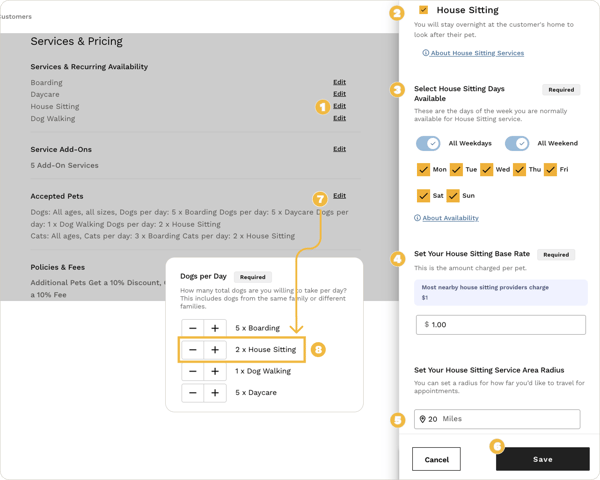
After enabling the service, it will appear on your profile and pet parents will be able to request bookings during the dates you have available.
How does scheduling work?
House Sitting is scheduled based on overnight stays.
You control:
- The dates you are available
- How many overnight bookings you accept
- Your service radius
Make sure your availability accurately reflects the dates you can stay in a pet parent’s home.
Will House Sitting show on my profile?
Yes. Once the service is enabled, House Sitting will appear on your public profile so pet parents can request overnight care.
Managing House Sitting Bookings
How do I receive booking requests?
House Sitting follows the standard booking process:
- You receive a booking request.
- You review the booking details.
- You accept or decline the request.
Where do I manage my upcoming bookings?
All upcoming bookings are available in your Bookings section, where you can:
- View booking details
- Message the pet parent
- Prepare for the stay
Can I message the pet parent?
Yes, you can message the pet parent at any time through the platform to:
- Confirm care instructions
- Ask questions about the home or pets
- Coordinate arrival and departure times
What should I confirm before the stay?
Before an House Sitting booking begins, it’s a good idea to confirm:
- Feeding schedules
- Medication instructions (if applicable)
- Pet routines
- Entry instructions for the home
- Emergency contact information
What if I need to change or can’t fulfill the booking?
If something changes, communicate with the pet parent as soon as possible through the messaging feature and follow the standard booking management process in your Bookings dashboard.