
As a Yourgi Pro, you can guide your clients on the easiest way to find and book you. Just share these simple steps to get them started:
- They can open the Yourgi website or app (on iOS or Android)
- Enter their location or zip code
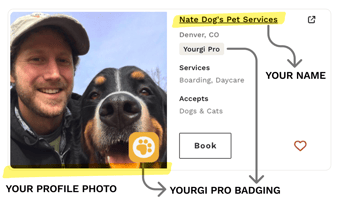
- Find your profile (look for your photo and the yellow Yourgi Pro badge)
- Select the service, dates, and submit the booking request
Once they book, you'll receive the request and can accept it directly in Yourgi.
After a booking is complete, you can encourage Pet Parents to leave a review and, if they’d like, a tip. Reviews help build trust with future clients, so sending a friendly follow-up message can go a long way in growing your business. Just keep in mind, Pet Parents have up to 21 days after the booking ends to leave a review.
Here is step by step guide for how pet parents leave reviews, in case they need any help
Step-by-Step: Leaving a Review
-
Log in to your Yourgi account
You can do this through the app or on the Yourgi website. -
Go to “Bookings”
Select the Bookings option from your account menu. -
Find the completed booking
Locate the service you’d like to review. -
Tap or click “Leave a Review”
This will open the review screen for that booking. -
Rate your Yourgi Pro
Choose a star rating and share feedback about your experience. -
Add a tip (optional, but appreciated!) ⭐
You’ll have the option to leave a tip directly during the review process.
Tips go 100% to your Yourgi Pro and are a great way to say thank you for exceptional care. -
Submit your review
Once submitted, your review helps recognize your Pro and supports the Yourgi community.
🎥 Prefer to watch instead?
We also have a short video walkthrough that shows exactly how your customers can leave a review and tip step-by-step.
💛 Why Reviews & Tips Matter
-
Reviews help other Pet Parents feel confident booking care
-
Tips go directly to the Yourgi Pro
-
Both support the people who care for your pets like family
If you need help or don’t see the review option, feel free to reach out — we’re happy to help! 🐾