
Ratings, reviews, and testimonials provide powerful social proof by showcasing real customer experiences and building confidence with potential clients. Requesting testimonials through Yourgi is quick and easy, just follow the steps below to start collecting feedback that supports your business right away.
Step-by-Step
-
Log in to your Yourgi account
You can do this through the app or on the Yourgi website -
On the Dashboard you will see a new card
This card will allow you to request testimonials and see your average star rating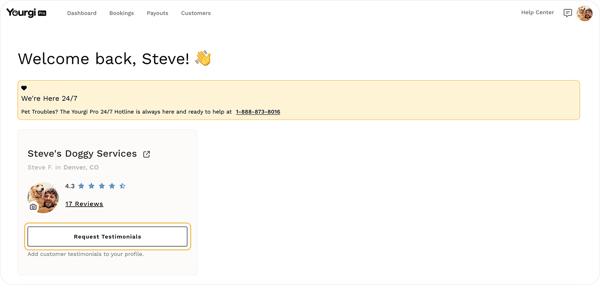
-
Click the "Request Testimonials" button inside the dashboard card
-
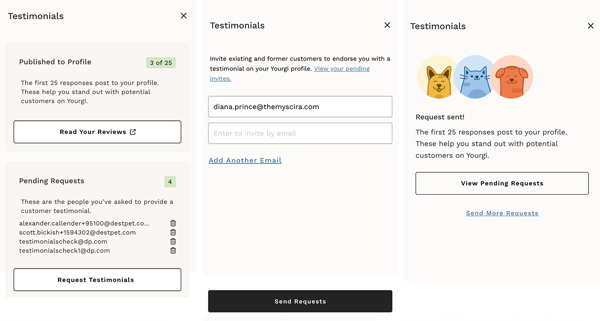
At the bottom of the pop up select "Request Testimonials"
- Enter the email address of whom you would like to send the request
- If you have more than one, be sure to "Add Another Email"
- Once all email addresses have been entered "Send Requests"
-
- Once you have sent the request you can View Pending Requests (as seen in the left screenshot).
- From the main testimonials screen you can Read Your Reviews or you can delete your Pending Requests
💛 Benefits of Testimonials
-
Builds trust with new customers
Authentic feedback from real clients helps establish credibility and reassures potential customers that your services are reliable and high-quality. -
Strengthens your brand at launch
Testimonials give your business a voice early on, helping you stand out and feel established even in the early stages. -
Influences booking decisions
Many customers rely on reviews before choosing a service—positive testimonials can directly increase conversions and bookings.