
Start by downloading the CSV template. Click to download.
Follow these steps:
- Include one customer per row with at least a name and email address.
- Use the template to ensure columns are formatted correctly
First Name, Last Name, Email, Phone optional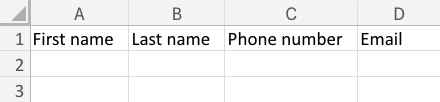
- Double-check that emails are valid. This is how customers receive their invite.
NOTE: If a customer already exists, we’ll skip duplicates automatically.
What are the benefits of uploading your customer list to Yourgi?
- Makes it easier for your customers to book with you using Yourgi
- They can create their profile and individual pet profiles now, so when it comes time to book it's a piece of cake
- Pet parents who book through Yourgi will earn rewards for every booking - learn more about Yourgi Rewards here.
Having issues getting your customer list uploaded, don't hesitate to reach out to the support team.