
How do I manage my availability?
Once you are in the Yourgi Pro platform you can manage your availability by navigating to the Bookings tab, and selecting the "Manage Your Availability" button in the top right.

Recurring Availability
Boarding and Daycare availability can be managed separately.
- Navigate to the Bookings tab
- Select Manage Your Availability button
- Choose Edit Recurring Availability
- Daycare and Boarding services can be updated independently of each other
- Use the quick selects to select All Weekdays or All Weekends. You can also individually choose the days that you are able to accept bookings.
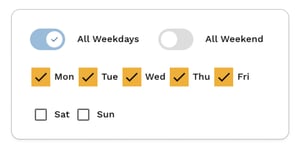
- Be sure to Save before closing out.
Manage Specific Dates
- Navigate to the Bookings tab
- Select Manage Your Availability button
- Next to Manage Specific Dates, select Edit
- On the calendar, choose a date to modify
- Use the toggle to set your business as opened or closed for the day
- Be sure to Save before closing out
📝 Note: When modifying availability for a specific date, (as shown in the example above), you can also update the number of pets you would like to accept. When you choose to be open on a day you normally are closed, you can state if you would like to accept more or less pets on that day. Providing you with ultimate control of your business.