
Invite, manage and view all of your customers in one place. Follow the steps below to invite customers to join the Yourgi platform and stay up to date on their status.
Step-by-Step
-
Log in to your Yourgi account
You can do this through the app or on the Yourgi website. -
Go to “Customers”
Select the Customers option from your account menu.
-
From here you will have 2 different ways that you can invite your customers, individually or bulk upload
-
-
Email address
Select Invite > Invite Via Email > Input customers Name and Email > Send Invite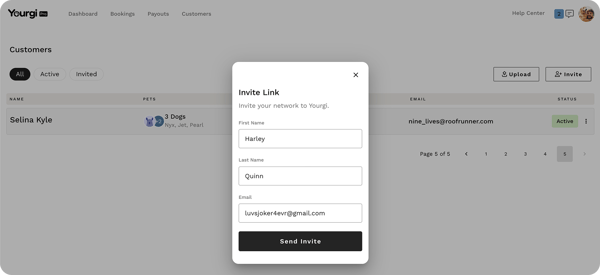
-
CSV list import
If you need help uploading your customer list, check out this guide.
Select Upload > Download Template. Input data within the template> Upload the template > Invitations will automatically be sent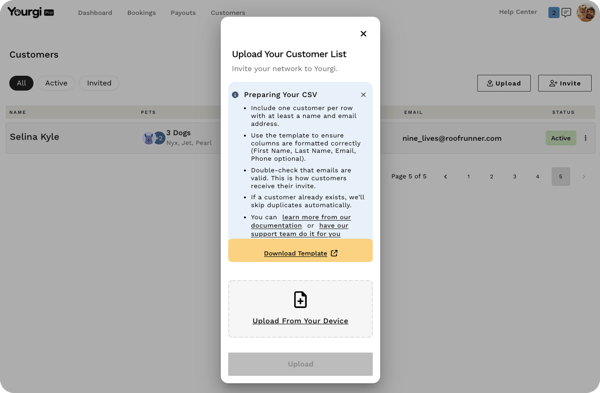
-
💛 Benefits of inviting your customers to join Yourgi
-
By inviting your customers individually or through the CSV import it will automatically send a personalized email directly to your customer inviting them to join Yourgi.
- Once your customers are on the Yourgi platform they will start earning rewards for bookings they are already making. Additionally they will earn rewards on other services thy book through Yourgi, like vets and groomers.
- As a Pro you will be able to track the status of the customers you invite with an Active, Inactive or Pending status marker in line with each invitation.